众所周知,Steam Workshop的某些神秘项目需要登录账号后才能获取到对应内容,这无疑为我们自动化获取数据带来了不便
这个时候就需要附带cookie进行请求了
但是呢,steam的登录状态cookie即steamLoginSecure通常是一天就过期了,如果我们次次手动抓取会很麻烦
因此就有了这个教程——自动刷新steamLoginSecure!
那么接下来就是神秘教程~
抓包
首先我们打开 Charles,我使用的版本是 4.6.7
- 先在
Help -- SSL Proxing -- Install Charles Root Certificates安装好Clarles的证书,因为后面要解SSL的流量 - 随后启动妙妙工具,我使用的是
V2XXX,启动后查看左下角的本地代理端口 并且选择:清除系统代理 ,之后返回Charles,点击Proxy -- External Proxy Settings,勾选Use external proxy server后,勾选上下面的Web Proxy和SOCKS Proxy并对应填好前面看到的端口 Proxy -- SSL Proxying Settings,启用后include处添加一个*Proxy -- Windows Proxy勾选上- 打开Chrome/Edge,登录一次steam账号。
- 返回 https://steamcommunity.com/ ,左上角点击清除cookie
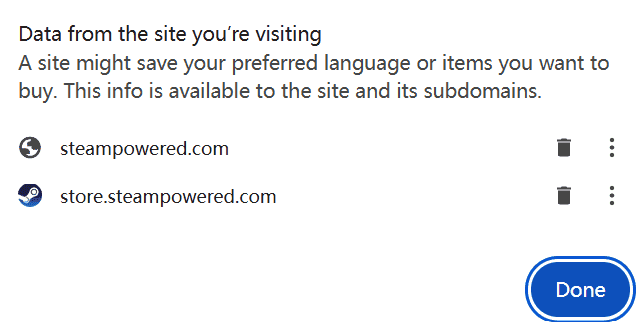
- 清除后发现已经退出登录了。再次点击登录后会直接登录成功
- 返回Charles,此时使用filter查找login.steampowered.com的请求,会发现如下的东西:
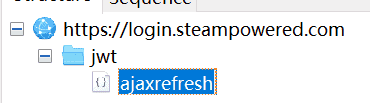
这样就是抓包成功了。随后点开Contents一栏,下面的Cookie就是我们所需要的持久凭证。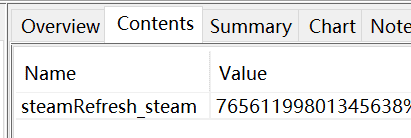
脚本自动获取steamLoginSecure
很遗憾,上面找到的steamRefresh_steam并不能直接拿来当作账号cookie使用,但它是一个较为持久、一次登录后短时间内不会失效的凭证
借此我们可以通过以下脚本来自动刷新账号cookie:
import requests
import os
import subprocess
# from dotenv import load_dotenv
from datetime import datetime


def post_ajaxrefresh():
    url = "https://login.steampowered.com/jwt/ajaxrefresh"
    data = '''------WebKitFormBoundaryFpIXysbQReBvAP3T\nContent-Disposition: form-data; name="redir"\n\nhttps://steamcommunity.com\n------WebKitFormBoundaryFpIXysbQReBvAP3T--'''
    cookies = {
            'steamRefresh_steam':'此处填入steamRefresh_steam'
    }
    try:
        response = requests.post(
            url=url,
            headers={
                'Host': 'login.steampowered.com',
                'sec-ch-ua': '"Not_A Brand";v="8", "Chromium";v="120", "Google Chrome";v="120"',
                'Accept': 'application/json, text/plain, */*',
                'Content-Type': 'multipart/form-data; boundary=----WebKitFormBoundaryFpIXysbQReBvAP3T',
                'sec-ch-ua-mobile': '?0',
                'User-Agent': 'Mozilla/5.0 (Windows NT 10.0; Win64; x64) AppleWebKit/537.36 (KHTML, like Gecko) Chrome/120.0.0.0 Safari/537.36',
                'sec-ch-ua-platform': '"Windows"',
                'Origin': 'https://steamcommunity.com',
                'Sec-Fetch-Site': 'cross-site',
                'Sec-Fetch-Mode': 'cors',
                'Sec-Fetch-Dest': 'empty',
                'Referer': 'https://steamcommunity.com/',
                'Accept-Language': 'zh,zh-CN;q=0.9',
                'Content-Length': '199'
            },
            timeout=8,
            cookies=cookies,
            data=data,
            verify=False
        )
        return response.json()
    except Exception as e:
        print(f"steam 刷新cookie在第一步时遇到错误: {e}")
        return {}

def post_settoken(result_json):
    url = "https://steamcommunity.com/login/settoken"
    cookies = {}
    steamID = result_json['steamID']
    nonce = result_json['nonce']
    redir = result_json['redir']
    auth = result_json['auth']
    data = f"""------WebKitFormBoundaryOAaAoQLiUVAH71AI\nContent-Disposition: form-data; name="steamID"\n\n{steamID}\n------WebKitFormBoundaryOAaAoQLiUVAH71AI\nContent-Disposition: form-data; name="nonce"\n\n{nonce}\n------WebKitFormBoundaryOAaAoQLiUVAH71AI\nContent-Disposition: form-data; name="redir"\n\n{redir}\n------WebKitFormBoundaryOAaAoQLiUVAH71AI\nContent-Disposition: form-data; name="auth"\n\n{auth}\n------WebKitFormBoundaryOAaAoQLiUVAH71AI--"""
    try:
        response = requests.post(
            url=url,
            headers={
                "Host": "steamcommunity.com",
                "sec-ch-ua": "\"Not_A Brand\";v=\"8\", \"Chromium\";v=\"120\", \"Google Chrome\";v=\"120\"",
                "Accept": "application/json, text/plain, */*",
                "Content-Type": "multipart/form-data; boundary=----WebKitFormBoundaryOAaAoQLiUVAH71AI",
                "sec-ch-ua-mobile": "?0",
                "User-Agent": "Mozilla/5.0 (Windows NT 10.0; Win64; x64) AppleWebKit/537.36 (KHTML, like Gecko) Chrome/120.0.0.0 Safari/537.36",
                "sec-ch-ua-platform": "\"Windows\"",
                "Origin": "https://steamcommunity.com",
                "Sec-Fetch-Site": "same-origin",
                "Sec-Fetch-Mode": "cors",
                "Sec-Fetch-Dest": "empty",
                "Referer": "https://steamcommunity.com",
                "Accept-Language": "zh,zh-CN;q=0.9"
            },
            cookies=cookies,
            data=data,
            verify=False
        )
        set_cookie = response.headers.get('Set-Cookie')
        if set_cookie:
            steamLoginSecure = set_cookie.split('steamLoginSecure=')[1].split('; Expires')[0]
            return steamLoginSecure
        else:
            raise Exception("未获取到steamLoginSecure")
    except Exception as e:
        print(f"在更新steam cookie第二步时遇到错误:{e}")
    return None
TIP: 在请求时可能需要使用一些神秘魔法
至此,你已经可以自动获取steam的账号cookie了,快去玩吧(
评论